REA MCP
☰
KO
● — 명 접속 중 · 조회 — 회
후원사례 제출
튜토리얼 자료 · 작성자 Vox

Claude Code 또는 Codex에 REA를 추가하는 것을 강력히 추천합니다. 이름은 𝗥𝗲𝘃의 약자입니다

Claude Code 또는 Codex에 REA를 추가하는 것을 강력히 추천합니다. 이름은 𝗥𝗲𝘃𝗲𝗿𝘀𝗲 𝗘𝗻𝗴𝗶𝗻𝗲𝗲𝗿 𝗔𝗻𝘆𝘁𝗵𝗶𝗻𝗴의 약자입니다. 다른 앱에서 마음에 드는 기능이 있나요? 에이전트에게 그것을 분해하게 하여 어떻게 구축되었는지 확인한 다음, 프로젝트에서 𝗯𝘂𝗶𝗹𝗱 𝘆𝗼𝘂𝗿 𝗼𝘄𝗻 𝘃𝗲𝗿𝘀𝗶𝗼𝗻을 만드세요. GitHub 일일 트렌드에서 이틀 연속 1위를 차지했으며 60K 스타를 넘었습니다.

V
Vox@Voxyz_ai

1/

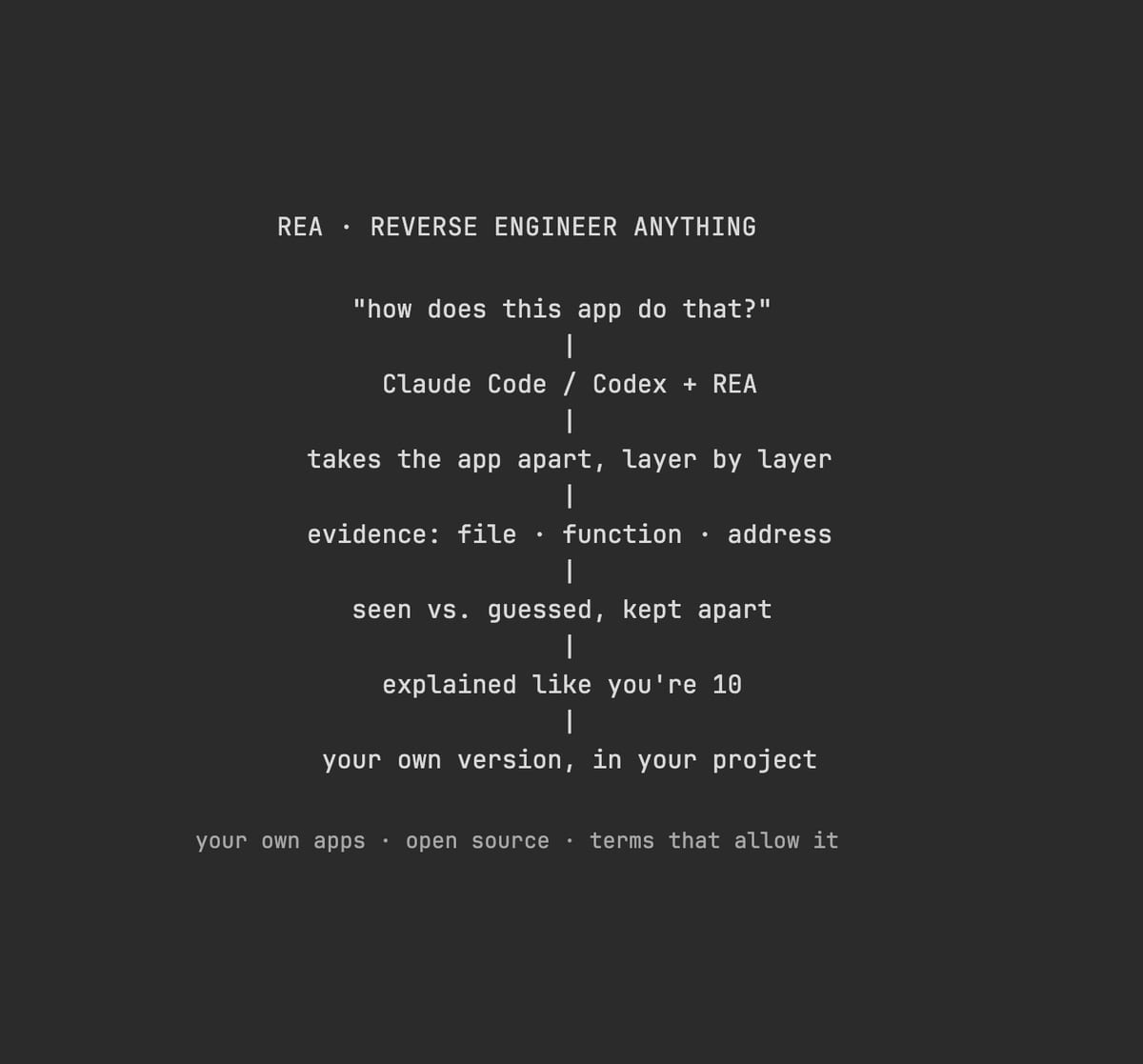
Highly recommend adding REA to Claude Code or Codex. The name stands for 𝗥𝗲𝘃𝗲𝗿𝘀𝗲 𝗘𝗻𝗴𝗶𝗻𝗲𝗲𝗿 𝗔𝗻𝘆𝘁𝗵𝗶𝗻𝗴. See a feature you like in another app? Have your agent take it apart to see how it's built, then 𝗯𝘂𝗶𝗹𝗱 𝘆𝗼𝘂𝗿 𝗼𝘄𝗻 𝘃𝗲𝗿𝘀𝗶𝗼𝗻 in your project. It's been #1 on GitHub's daily trending two days running and is past 60K stars. The apps on your computer are finished products. Think of a baked cake: you can taste it, but you can't see the recipe. REA hands your agent the tools made for taking software apart. It works down layer by layer, shows you where each finding comes from, and then walks you through the recipe. You can point it at desktop apps, websites and Android apps. Ask it things like: → "How does this notes app show search results the moment I start typing?" → "Why does text copied from Notion keep its formatting when I paste it somewhere else?" → "How does this old game work out that ring of bullets?" → "Our company's 10-year-old internal tool lost its source code years ago. What is it actually doing?" Take apart your own software and open-source code as much as you like. For anyone else's, check the terms first, since many forbid reverse engineering. Don't bring it cracking or license-bypass jobs; the model will most likely refuse anyway. Run npx rea-agents setup in your terminal, pick your agent when it asks, and restart it. Then send this prompt to Opus 5.5 👇 "I want to use REA to figure out how a feature in some software works. 1. First ask me which app and which feature I want to study, then have me say whether it's my own, open source, or software whose terms allow reverse engineering. If I can't say, don't start. 2. Work out what kind of program it is first. If you need Hopper, Ghidra or IDA, tell me which one is missing and where to get it. Don't install it yourself. 3. Back every finding with evidence: which file, which function or address. Keep what you saw separate from what you're guessing. At the end, explain it all in words a 10-year-old could follow. 4. Once it's clear, tell me the minimum pieces I'd need to write to build something similar in my own project, without copying its code. Show me the plan first, and only start writing after I agree." https://github.com/morluto/rea
이미지1
번역 완료

이 사례에 대하여

Claude Code 또는 Codex에 REA를 추가하는 것을 강력히 추천합니다. 이름은 𝗥𝗲𝘃𝗲𝗿𝘀𝗲 𝗘𝗻𝗴𝗶𝗻𝗲𝗲𝗿 𝗔𝗻𝘆𝘁𝗵𝗶𝗻𝗴의 약자입니다. 다른 앱에서 마음에 드는 기능이 있나요? 에이전트에게 그것을 분해하게 하여 어떻게 구축되었는지 확인한 다음, 프로젝트에서 𝗯𝘂𝗶𝗹𝗱 𝘆𝗼𝘂𝗿 𝗼𝘄𝗻 𝘃𝗲𝗿𝘀𝗶𝗼𝗻을 만드세요. GitHub 일일 트렌드에서 이틀 연속 1위를 차지했으며 60K 스타를 넘었습니다.

컴퓨터의 앱은 완성품입니다. 구운 케이크를 생각해보세요. 맛은 볼 수 있지만 레시피는 볼 수 없습니다. REA는 소프트웨어를 분해하기 위해 만들어진 도구를 에이전트에게 제공합니다. 층별로 작업하며 각 발견의 출처를 보여주고 레시피를 안내합니다. 데스크톱 앱, 웹사이트, Android 앱을 대상으로 지정할 수 있습니다.

다음과 같은 것을 물어보세요: → "이 노트 앱은 입력을 시작하는 순간 검색 결과를 어떻게 표시하나요?" → "Notion에서 복사한 텍스트가 다른 곳에 붙여넣을 때 서식을 유지하는 이유는 무엇인가요?" → "이 오래된 게임은 그 총알 고리를 어떻게 계산하나요?" → "우리 회사의 10년 된 내부 도구는 몇 년 전에 소스 코드를 잃어버렸습니다. 실제로 무엇을 하고 있나요?"

자신의 소프트웨어와 오픈 소스 코드는 원하는 만큼 분해하세요. 다른 사람의 것은 많은 경우 리버스 엔지니어링을 금지하므로 먼저 약관을 확인하세요. 크래킹이나 라이선스 우회 작업을 가져오지 마세요. 모델은 대부분 거부할 것입니다.

터미널에서 npx rea-agents setup을 실행하고, 요청하면 에이전트를 선택한 다음 재시작하세요. 그런 다음 이 프롬프트를 Opus 5.5에 보내세요 👇

"REA를 사용하여 일부 소프트웨어의 기능이 어떻게 작동하는지 알아내고 싶습니다.

  1. 먼저 어떤 앱과 어떤 기능을 연구하고 싶은지 물어보고, 그것이 내 것인지, 오픈 소스인지, 아니면 리버스 엔지니어링을 허용하는 약관이 있는 소프트웨어인지 말하게 하세요. 말할 수 없으면 시작하지 마세요.
  2. 먼저 그것이 어떤 종류의 프로그램인지 파악하세요. Hopper, Ghidra 또는 IDA가 필요하면 어떤 것이 없는지, 어디서 구할 수 있는지 알려주세요. 직접 설치하지 마세요.
  3. 모든 발견을 증거로 뒷받침하세요: 어떤 파일, 어떤 함수 또는 주소. 본 것과 추측을 분리하세요. 마지막으로 10살 아이도 이해할 수 있는 말로 설명하세요.
  4. 명확해지면, 내 프로젝트에서 유사한 것을 구축하기 위해 작성해야 할 최소한의 부분을 알려주세요. 그 코드를 복사하지 않고. 먼저 계획을 보여주고, 내가 동의한 후에만 작성을 시작하세요."

https://t.co/K2ZekYitTW

설정

설치 방법은 원본 출처를 확인하세요.

원문 / README

Highly recommend adding REA to Claude Code or Codex. The name stands for 𝗥𝗲𝘃𝗲𝗿𝘀𝗲 𝗘𝗻𝗴𝗶𝗻𝗲𝗲𝗿 𝗔𝗻𝘆𝘁𝗵𝗶𝗻𝗴. See a feature you like in another app? Have your agent take it apart to see how it's built, then 𝗯𝘂𝗶𝗹𝗱 𝘆𝗼𝘂𝗿 𝗼𝘄𝗻 𝘃𝗲𝗿𝘀𝗶𝗼𝗻 in your project. It's been #1 on GitHub's daily trending two days running and is past 60K stars.

The apps on your computer are finished products. Think of a baked cake: you can taste it, but you can't see the recipe. REA hands your agent the tools made for taking software apart. It works down layer by layer, shows you where each finding comes from, and then walks you through the recipe. You can point it at desktop apps, websites and Android apps.

Ask it things like: → "How does this notes app show search results the moment I start typing?" → "Why does text copied from Notion keep its formatting when I paste it somewhere else?" → "How does this old game work out that ring of bullets?" → "Our company's 10-year-old internal tool lost its source code years ago. What is it actually doing?"

Take apart your own software and open-source code as much as you like. For anyone else's, check the terms first, since many forbid reverse engineering. Don't bring it cracking or license-bypass jobs; the model will most likely refuse anyway.

Run npx rea-agents setup in your terminal, pick your agent when it asks, and restart it. Then send this prompt to Opus 5.5 👇

"I want to use REA to figure out how a feature in some software works.

  1. First ask me which app and which feature I want to study, then have me say whether it's my own, open source, or software whose terms allow reverse engineering. If I can't say, don't start.
  2. Work out what kind of program it is first. If you need Hopper, Ghidra or IDA, tell me which one is missing and where to get it. Don't install it yourself.
  3. Back every finding with evidence: which file, which function or address. Keep what you saw separate from what you're guessing. At the end, explain it all in words a 10-year-old could follow.
  4. Once it's clear, tell me the minimum pieces I'd need to write to build something similar in my own project, without copying its code. Show me the plan first, and only start writing after I agree."

https://github.com/morluto/rea

비슷한 프로젝트