REA MCP
☰
ZH-CN
● — 人在线 · 浏览 — 次
赞助提交案例
教程资源 · 发布者 Vox

强烈推荐将 REA 添加到 Claude Code 或 Codex。这个名字代表 𝗥𝗲𝘃

强烈推荐将 REA 添加到 Claude Code 或 Codex。这个名字代表 𝗥𝗲𝘃𝗲𝗿𝘀𝗲 𝗘𝗻𝗴𝗶𝗻𝗲𝗲𝗿 𝗔𝗻𝘆𝘁𝗵𝗶𝗻𝗴。在另一个应用中看到你喜欢的功能?让你的智能体把它拆解,看看它是如何构建的,然后在你的项目中构建你自己的版本。它已经连续两天在 GitHub 每日趋势中排名第一,并且超过了 60K 星。

V
Vox@Voxyz_ai

1/

Highly recommend adding REA to Claude Code or Codex. The name stands for 𝗥𝗲𝘃𝗲𝗿𝘀𝗲 𝗘𝗻𝗴𝗶𝗻𝗲𝗲𝗿 𝗔𝗻𝘆𝘁𝗵𝗶𝗻𝗴. See a feature you like in another app? Have your agent take it apart to see how it's built, then 𝗯𝘂𝗶𝗹𝗱 𝘆𝗼𝘂𝗿 𝗼𝘄𝗻 𝘃𝗲𝗿𝘀𝗶𝗼𝗻 in your project. It's been #1 on GitHub's daily trending two days running and is past 60K stars. The apps on your computer are finished products. Think of a baked cake: you can taste it, but you can't see the recipe. REA hands your agent the tools made for taking software apart. It works down layer by layer, shows you where each finding comes from, and then walks you through the recipe. You can point it at desktop apps, websites and Android apps. Ask it things like: → "How does this notes app show search results the moment I start typing?" → "Why does text copied from Notion keep its formatting when I paste it somewhere else?" → "How does this old game work out that ring of bullets?" → "Our company's 10-year-old internal tool lost its source code years ago. What is it actually doing?" Take apart your own software and open-source code as much as you like. For anyone else's, check the terms first, since many forbid reverse engineering. Don't bring it cracking or license-bypass jobs; the model will most likely refuse anyway. Run npx rea-agents setup in your terminal, pick your agent when it asks, and restart it. Then send this prompt to Opus 5.5 👇 "I want to use REA to figure out how a feature in some software works. 1. First ask me which app and which feature I want to study, then have me say whether it's my own, open source, or software whose terms allow reverse engineering. If I can't say, don't start. 2. Work out what kind of program it is first. If you need Hopper, Ghidra or IDA, tell me which one is missing and where to get it. Don't install it yourself. 3. Back every finding with evidence: which file, which function or address. Keep what you saw separate from what you're guessing. At the end, explain it all in words a 10-year-old could follow. 4. Once it's clear, tell me the minimum pieces I'd need to write to build something similar in my own project, without copying its code. Show me the plan first, and only start writing after I agree." https://github.com/morluto/rea
图片1
已翻译

关于这个案例

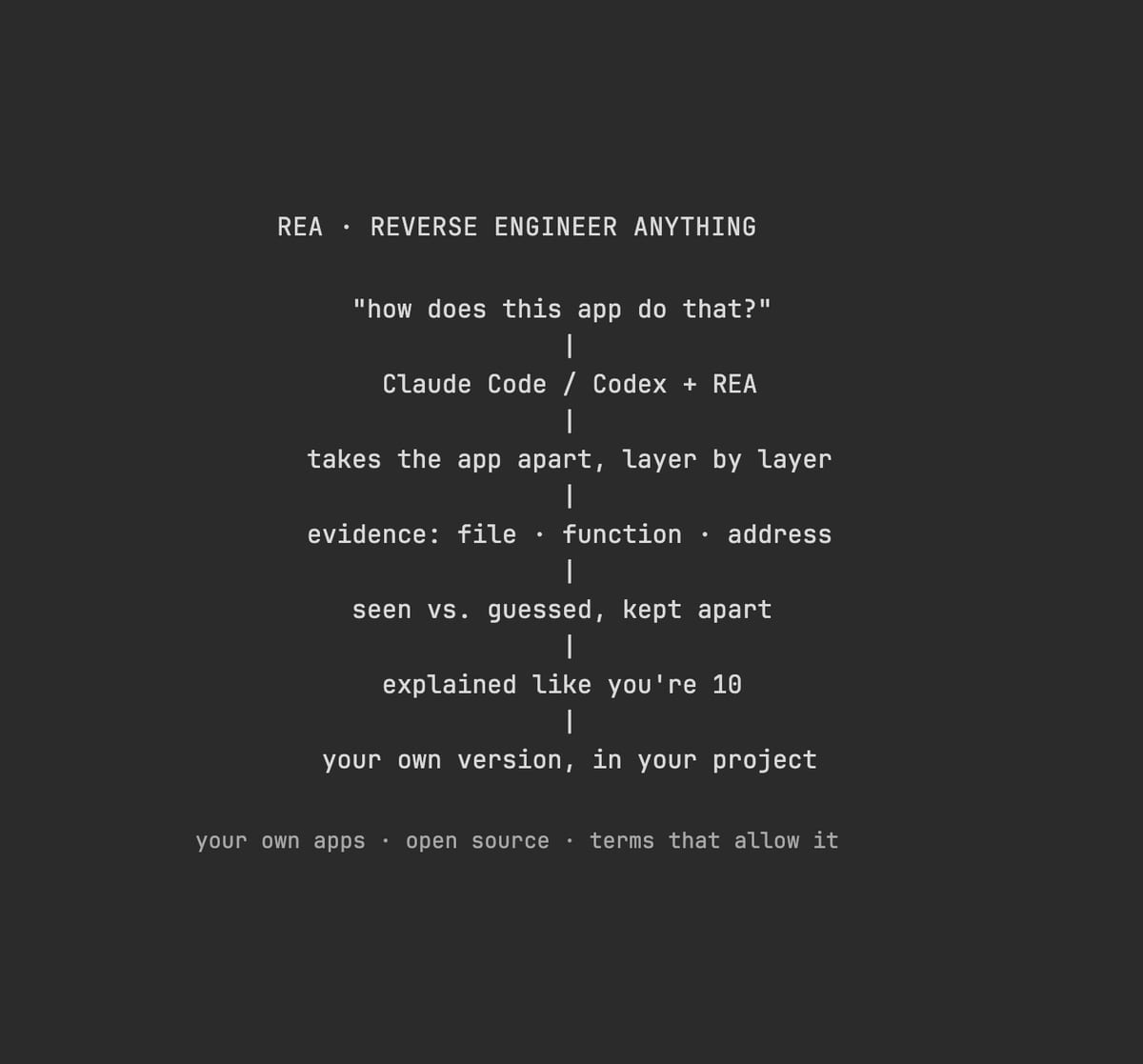
强烈推荐将 REA 添加到 Claude Code 或 Codex。这个名字代表 𝗥𝗲𝘃𝗲𝗿𝘀𝗲 𝗘𝗻𝗴𝗶𝗻𝗲𝗲𝗿 𝗔𝗻𝘆𝘁𝗵𝗶𝗻𝗴。在另一个应用中看到你喜欢的功能?让你的智能体把它拆解,看看它是如何构建的,然后在你的项目中构建你自己的版本。它已经连续两天在 GitHub 每日趋势中排名第一,并且超过了 60K 星。

你电脑上的应用是成品。想象一个烤好的蛋糕:你可以品尝它,但你看不到食谱。REA 将用于拆解软件的工具交给你的智能体。它一层一层地工作,向你展示每个发现的来源,然后引导你完成食谱。你可以将它指向桌面应用、网站和 Android 应用。

问它这样的问题: → “这个笔记应用如何在我开始输入时立即显示搜索结果?” → “为什么从 Notion 复制的文本在粘贴到其他地方时保持其格式?” → “这个老游戏如何计算出那圈子弹?” → “我们公司 10 年前的内部工具多年前丢失了源代码。它实际上在做什么?”

你可以随意拆解你自己的软件和开源代码。对于其他人的,先检查条款,因为许多禁止逆向工程。不要带来破解或绕过许可证的任务;模型很可能会拒绝。

在终端中运行 npx rea-agents setup,当它询问时选择你的智能体,然后重启它。然后发送这个提示给 Opus 5.5 👇

“我想使用 REA 来弄清楚某个软件中的某个功能是如何工作的。

  1. 首先问我想要研究哪个应用和哪个功能,然后让我说明它是我自己的、开源的,还是条款允许逆向工程的软件。如果我说不出来,就不要开始。
  2. 首先弄清楚它是什么类型的程序。如果你需要 Hopper、Ghidra 或 IDA,告诉我缺少哪一个以及在哪里获取。不要自己安装。
  3. 用证据支持每一个发现:哪个文件、哪个函数或地址。将你看到的与你猜测的分开。最后,用 10 岁孩子能听懂的话解释一切。
  4. 一旦清楚了,告诉我我需要编写的最小部分,以便在我自己的项目中构建类似的东西,而不复制它的代码。先给我看计划,只有在我同意后才开始编写。”

https://t.co/K2ZekYitTW

安装配置

安装方法请查看原始来源。

原文 / README

Highly recommend adding REA to Claude Code or Codex. The name stands for 𝗥𝗲𝘃𝗲𝗿𝘀𝗲 𝗘𝗻𝗴𝗶𝗻𝗲𝗲𝗿 𝗔𝗻𝘆𝘁𝗵𝗶𝗻𝗴. See a feature you like in another app? Have your agent take it apart to see how it's built, then 𝗯𝘂𝗶𝗹𝗱 𝘆𝗼𝘂𝗿 𝗼𝘄𝗻 𝘃𝗲𝗿𝘀𝗶𝗼𝗻 in your project. It's been #1 on GitHub's daily trending two days running and is past 60K stars.

The apps on your computer are finished products. Think of a baked cake: you can taste it, but you can't see the recipe. REA hands your agent the tools made for taking software apart. It works down layer by layer, shows you where each finding comes from, and then walks you through the recipe. You can point it at desktop apps, websites and Android apps.

Ask it things like: → "How does this notes app show search results the moment I start typing?" → "Why does text copied from Notion keep its formatting when I paste it somewhere else?" → "How does this old game work out that ring of bullets?" → "Our company's 10-year-old internal tool lost its source code years ago. What is it actually doing?"

Take apart your own software and open-source code as much as you like. For anyone else's, check the terms first, since many forbid reverse engineering. Don't bring it cracking or license-bypass jobs; the model will most likely refuse anyway.

Run npx rea-agents setup in your terminal, pick your agent when it asks, and restart it. Then send this prompt to Opus 5.5 👇

"I want to use REA to figure out how a feature in some software works.

  1. First ask me which app and which feature I want to study, then have me say whether it's my own, open source, or software whose terms allow reverse engineering. If I can't say, don't start.
  2. Work out what kind of program it is first. If you need Hopper, Ghidra or IDA, tell me which one is missing and where to get it. Don't install it yourself.
  3. Back every finding with evidence: which file, which function or address. Keep what you saw separate from what you're guessing. At the end, explain it all in words a 10-year-old could follow.
  4. Once it's clear, tell me the minimum pieces I'd need to write to build something similar in my own project, without copying its code. Show me the plan first, and only start writing after I agree."

https://github.com/morluto/rea

更多类似作品