REA (Reverse Engineer Anything)
Reverse engineer anything with agents, from app behavior down to native binaries.
Real cases of what people did with REA (Reverse Engineer Anything), the open-source MCP server for reverse engineering, each with its original source.
Launched: · Last updated:
Reverse engineer anything with agents, from app behavior down to native binaries.
Vídeo tutorial en español que explica qué es REA (herramienta MCP de ingeniería inversa), cómo funciona con agentes de IA como Claude Code, Codex o Cursor, cómo instalarlo y una demostración práctica creando una versión propia tipo Loom, incluyendo advertencias legales.
Vídeo em português que apresenta o REA (Reverse Engineer Anything), mostra como instalar, alerta sobre o golpe do REA falso e faz um teste real de engenharia reversa com IA no MarkText, editor de código aberto com 62 mil estrelas, apontando onde o agente acertou e onde errou.
A Reddit post in r/SATNA_PROJECT advertising a Claude prompt that uses REA (connected via `npx rea-agents setup`) to trace an app feature from UI to logic and build an original reimplementation, with a caution to only analyze software you own or are authorized to examine.
Vídeo en español que explica REA (Reverse Engineer Anything), su instalación con npx rea-agents, para qué sirve, sus seis límites y si permite cancelar suscripciones, usando como demo una app Electron propia analizada con permiso.
Based on REA's official README, release notes, DISCLAIMER, and Claude Code MCP documentation, this is an explanatory video that organizes the structure from agent → REA (MCP) → existing analysis tools, along with what REA can actually do, its limitations, and cases where it should not be used.
A video walkthrough of REA (Reverse Engineer Anything), the MIT-licensed open-source MCP server that connects AI coding agents to reverse-engineering tools such as Ghidra, IDA, Hopper, JADX and Frida, plus built-in analysis for JS/Electron, .NET, firmware, WASM, APKs and more. It explains the problem REA solves, how it works, three real investigations and fifteen real-world uses, and points to github.com/morluto/rea and rea.tools with the npx rea-agents setup command.
YouTube tutorial by Ben AI explaining the viral REA (Reverse Engineer Anything) repo from morluto/rea and showing a three-step process of using it to rebuild a Claude skill from example outputs.
One sponsored card rotates in after every 6 projects
Advertise hereAI LABS walks through REA (Reverse Engineer Anything), the trending MCP server for AI agents, showing setup with Claude Code and Codex and five tested use cases: cloning a feature like Obsidian's graph view, competitor analysis, bug hunting, performance checks and a security audit for exposed keys and data.
One sponsored card rotates in after every 6 projects
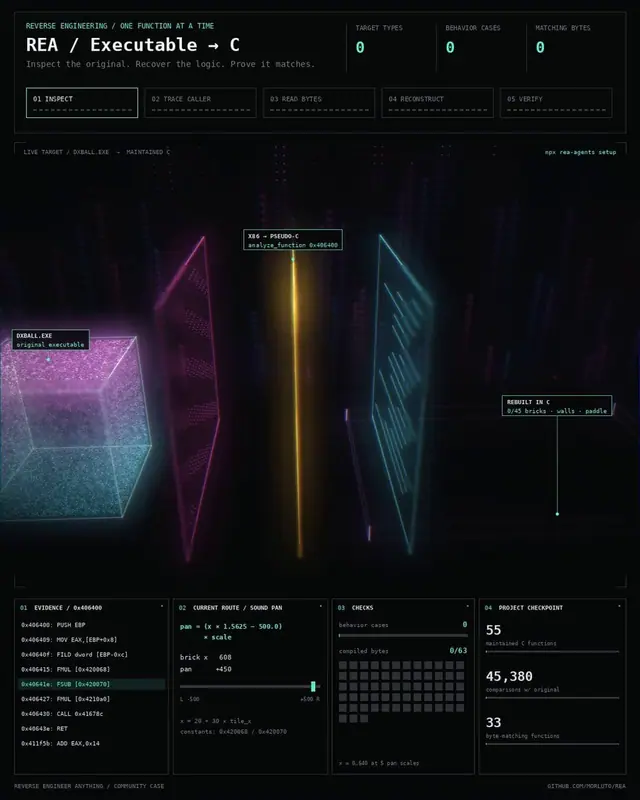
Advertise hereAn X post describing how AI agents used REA (the reverse engineering MCP) to recover functions from the DX-Ball executable, reconstructing a C version one function at a time with byte-for-byte comparison against the original x86 code.
 ▶ ♫
▶ ♫A YouTube Short claim-checking REA (morluto/rea) by asking five questions about the open-source Aegis authenticator app before opening its source; it reports 5/5 correct answers and links the repository, but shows no reproducible steps or detailed evidence.
A step-by-step YouTube guide to REA, the open-source MCP server for reverse engineering: it walks through the official GitHub repo, the npx rea-agents setup, supported agents (Claude Code, Codex, Cursor, Gemini CLI, Grok Build), optional tools such as Hopper, Ghidra and IDA, and an example prompt for investigating how an app works.
A video walkthrough showing how to install REA (Reverse Engineer Anything) safely and use it to build three new apps — a screen recorder, a screenshot markup tool, and a dictation/meeting-notes app — starting from the free, open-source projects ShareX, Greenshot and OpenWhispr. It covers the legal/licence limits, scanning the repo before install and keeping work in one lab folder.