czcdr@czcdr
czcdr/dsh-plugin-rea
ローカルにインストール済みの rea mcp(stdio)を DeepSeek Harness に登録するサードパーティ製 Cordis バンドル。REA ツールを会話内で mcp__rea__* の形式で呼び出せるようにする。それ自体はリバース解析を行わず、GHIDRA_INSTALL_DIR などのエンジン環境変数を該当 MCP 子プロセスに限定できる。
czcdr/dsh-plugin-rea
上流の REA(Reverse Engineer Anything、github.com/morluto/rea、MIT)の MCP サービスを DeepSeek Harness (dsh) に接続する純設定型プラグイン。公式の @deepseek-ai/dsh-mcp-client を再利用し、ローカルの rea mcp(stdio)をネイティブツール mcp__rea__* として登録する。ドキュメントでは、ネイティブバイナリ(擬似コード/アセンブリ/文字列/シンボル/呼び出しと参照)、JavaScript/Electron、Web サイト、.NET アセンブリ、Android APK、adb デバイス、JEB プロジェクト、ファームウェア、パッケージとリソース、プロセス動作、およびオフラインの ELF レイアウト、EVM バイトコード、記録済みの Linux クラッシュとパケットキャプチャを分析できることを説明している。また、ソースコードを完全には復元できないこと、各結論に observed/derived/inferred の信頼度と制限が付くことを強調している。Windows(cmd.exe /c rea mcp)と macOS/Linux(rea mcp)の設定例、profile で GHIDRA_INSTALL_DIR を上書きする方法、検証手順(binary_session、open_binary、binary_overview、procedure_pseudo_code)、更新方法を添付している。
インストール方法は元のソースをご確認ください。
把 REA — Reverse Engineer Anything 接入 DeepSeek Harness (dsh):
一个纯配置型 Cordis bundle,复用官方 MCP 客户端插件 @deepseek-ai/dsh-mcp-client,
把本机已安装的 rea mcp(stdio)注册成原生工具。装载后模型直接拥有 mcp__rea__* 工具。
与上游的关系(重要) 本仓库是第三方适配封装,不是 REA 项目的组成部分,也不包含 REA 的任何源码, 更不由 REA 作者维护。它只做一件事:向 dsh 的配置组合里插入一条指向你本机
rea安装的 MCP 服务器记录。
- 上游项目:REA — Reverse Engineer Anything — https://github.com/morluto/rea(MIT)
- 上游文档:https://github.com/morluto/rea#what-you-can-analyze · 中文 · 站点 https://rea.tools/
- 上游 npm 包:
rea-agents- 本插件仓库:https://github.com/czcdr/dsh-plugin-rea · npm:
dsh-plugin-rea- 问题反馈:REA 本身的问题请提到上游;本插件的问题提到 本仓库 Issues。
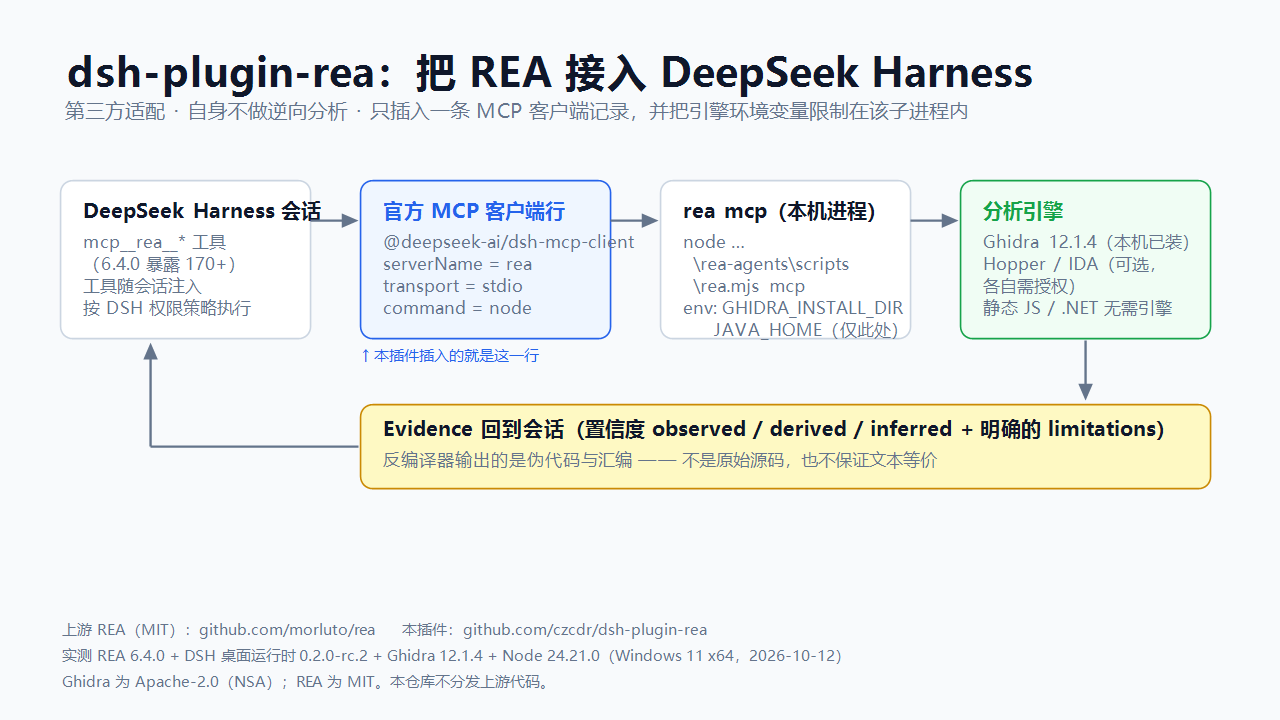
What it does. This plugin performs no reverse engineering itself. It connects the upstream REA
MCP server to DeepSeek Harness, so the tools REA ships become callable in a session as
mcp__rea__*.
In upstream's own words, REA is "one MCP for reverse engineering across binaries, applications, and runtime behavior" — "see a feature you like. Understand how it works, down to the binary level." It connects your agent to tools for inspecting native binaries, JavaScript and Electron apps, .NET assemblies, and websites; analysis runs locally, and results include the evidence and limitations behind each conclusion. Native analysis can use an existing Hopper, Ghidra, or IDA installation, and static JavaScript analysis needs no native engine.
Upstream's own coverage list (README.md#what-you-can-analyze): native binaries — pseudocode,
assembly, strings, symbols, calls and references; JavaScript/Electron apps — modules, imports, source
maps, routes, IPC; websites — page structure, scripts, network observations, screenshots; .NET
assemblies; Android APKs; Android devices over adb; JEB projects; Android resources; firmware;
packages and assets; process behavior; plus offline ELF layout, EVM bytecode, recorded Linux crashes
and saved network captures.
What this plugin adds. Exactly two things: it registers that MCP server into DSH's tool layer
under the mcp__rea__* names, and it lets the engine environment (GHIDRA_INSTALL_DIR, …) be scoped
to that MCP child process instead of the whole harness.
What it can and cannot do. The analysis is upstream's; this section only restates upstream's own contract so expectations are right.
observed / derived / inferred, plus an
explicit limitations list). Read them as evidence, never as recovered source.Verified against (author's machine, 2026-10-12/13):
| Component | Version |
|---|---|
| REA (rea-agents) | 6.4.0 |
| DeepSeek Harness (dsh desktop runtime) | 0.2.0-rc.2 |
| @deepseek-ai/dsh-mcp-client (row provider) | bundled by the harness; npm latest 0.0.1-rc.1 |
| Ghidra | 12.1.4 (REA currently accepts 12.1.x) |
| Node.js | 24.21.0 (REA engines: ^22.19.0 \|\| ^24.11.0 \|\| >=26.0.0) |
| Host | Windows 11 x64 |
The shipped row was exercised live: list_documents answered through the cmd.exe form, and
open_binary completed with the ghidra provider while the engine directory came only from a
profile-level override.
Prerequisites. Node.js (a version REA accepts) and the REA CLI installed globally
(npm i -g rea-agents). For native analysis, Ghidra 12.1.x (Hopper / IDA are alternatives under
their own licences). Static JavaScript/Electron and .NET analysis need no engine.
Install.
dsh plugin --profile <profile> add github:czcdr/dsh-plugin-rea
# or, from npm:
dsh plugin --profile <profile> add dsh-plugin-rea
A prebuilt tarball is attached to Releases (version-free asset name, so the link keeps resolving).
Configure — usually nothing. The shipped row carries no machine-specific path:
command: cmd.exe, args: ['/c', 'rea', 'mcp'] — the npm shim is a .cmd, so a shell is
required.command: rea, args: ['mcp'] — see
examples/cordis.patch.posix.yml.The only optional piece is the analysis engine. REA reads GHIDRA_INSTALL_DIR from its environment,
so either:
examples/cordis.patch.with-env.yml.Keep machine-specific values out of the plugin. Override the row from your own profile's
cordis.patch.yml (id-targeted config override). That file is machine-local and never published:
- id: mcp-rea
  config:
    env:
      GHIDRA_INSTALL_DIR: '<your Ghidra 12.1.x directory>'
Only one row may use serverName: rea in a profile.
Verify. Ask for a mcp__rea__* call — binary_session reports the engine checks
(configuration / installation / headless / native_decompiler / java), all of which should be
ok: true. Then open_binary a PE, binary_overview, and procedure_pseudo_code.
Scope and caveats. REA exposes 170+ tools at 6.4.0, so every session's tool list grows; the row
sets failOnStartupError: false so a missing REA never blocks harness startup. Some REA tools launch
processes, write files and access the network — DSH's permission policy applies. Analyse only
artifacts you are authorized to inspect.
Updating — two independent things, both manual.
file: checkout? Overwrite the directory and install it again. Updating REA
below does not update this plugin, and updating this plugin does not touch REA.npm i -g rea-agents@latest. Its bin entry (scripts/rea.mjs) is stable across
releases, so this needs no change here.Config.listConfigs name=@deepseek-ai/dsh-mcp-client and adjust the field names.check-updates.ps1 (Windows PowerShell) reports the state of all four at once, and
.github/workflows/validate.yml enforces the bundle's shape — including "the shipped patch must not
contain a machine-specific path" — in CI.
License. MIT (this adapter). REA is MIT and owned by its authors; Ghidra is Apache-2.0 and owned by the NSA. No upstream code is redistributed here.
作用。 本插件自身不做任何逆向分析。它把上游 REA 的 MCP 服务接入 DeepSeek Harness,
让 REA 提供的那套工具在会话里变成可直接调用的 mcp__rea__*。
按上游自述,REA 是「通过一个 MCP 服务,逆向分析二进制文件、应用程序和运行时行为」—— 「看到喜欢的功能,弄清它的工作原理,深入到二进制层面」。它「将智能体连接到分析工具,用于检查 原生二进制文件、JavaScript 和 Electron 应用、.NET 程序集以及网站」;分析在本机运行,结果包含 支撑各项结论的证据和相关限制。原生分析可以使用已有的 Hopper、Ghidra 或 IDA,静态 JavaScript 分析 不需要原生引擎。
上游列出的可分析目标(原文见 README_zh.md#可以分析什么): 原生二进制文件——伪代码、汇编、字符串、符号、调用和引用;JavaScript / Electron——模块、导入、 source map、路由与 IPC;网站——页面结构、脚本、网络观察结果与截图;.NET 程序集;Android APK; Android 设备(adb);JEB 项目;Android 资源;固件;软件包与资源;进程行为;以及离线 ELF 布局、 EVM 字节码、已记录的 Linux 崩溃与已保存的网络捕获。
本插件在此之上只增加两件事:把该 MCP 服务注册进 DSH 的工具层(工具名 mcp__rea__*),
以及让引擎环境变量(GHIDRA_INSTALL_DIR 等)只作用于这个 MCP 子进程,而不是整个 harness。
能做什么、不能做什么(重要)。 分析能力由上游提供;这里只复述上游自己的契约,避免预期错位。
observed / derived / inferred,另有 limitations 列表):
请把它们当作证据使用,而不要当作"已还原的源码"。已验证版本(作者机器,2026-10-12/13):REA 6.4.0、DeepSeek Harness 桌面运行时 0.2.0-rc.2、
Ghidra 12.1.4、Node 24.21.0、Windows 11 x64。行提供方 @deepseek-ai/dsh-mcp-client 由
harness 自带(npm 最新 0.0.1-rc.1)。发布用的这一行实测跑通过:list_documents 在
cmd.exe 形式下正常应答,open_binary 走 ghidra 提供方成功,而引擎目录仅来自本机 profile 覆盖。
前置条件。 满足 REA 要求的 Node;全局安装 REA(npm i -g rea-agents)。原生分析需要
Ghidra 12.1.x(Hopper / IDA 为替代方案,各自需授权);静态 JavaScript/Electron 与 .NET 分析
不需要引擎。
安装。
dsh plugin --profile <profile> add github:czcdr/dsh-plugin-rea
# 或从 npm 安装:
dsh plugin --profile <profile> add dsh-plugin-rea
Releases 附带预构建 tarball(资产名不带版本号, 链接不会失效)。
配置——通常什么都不用改。 发布出去的那一行不含任何机器相关路径:
command: cmd.exe、args: ['/c', 'rea', 'mcp'] —— npm 的 shim 是 .cmd,必须经 shell。command: rea、args: ['mcp'] —— 见
examples/cordis.patch.posix.yml。唯一可选的是分析引擎。REA 从环境读取 GHIDRA_INSTALL_DIR,二选一:
examples/cordis.patch.with-env.yml。机器相关值不要写进插件。 用你自己的 profile cordis.patch.yml 按 id 覆盖这一行即可;
该文件只在你本机、永不随插件发布:
- id: mcp-rea
  config:
    env:
      GHIDRA_INSTALL_DIR: '<你的 Ghidra 12.1.x 目录>'
同一 profile 内 serverName: rea 只能有一条记录。
验证。 调用任一 mcp__rea__* 工具:binary_session 会给出引擎检查项
(configuration / installation / headless / native_decompiler / java),应全部 ok: true;
随后 open_binary 打开一个 PE → binary_overview → procedure_pseudo_code。
范围与注意。 REA 在 6.4.0 暴露 170+ 个工具,注入后每个会话的工具列表都会变大;行内设置
failOnStartupError: false,因此 REA 缺失也不会阻塞 harness 启动。部分 REA 工具会启动进程、
写文件、访问网络,按 DSH 的权限策略执行。请仅分析你已获得授权的目标。
更新:两件事,且都要手动。
file: 目录方式安装的,
覆盖目录后在插件管理器里重装。下面更新 REA 不会更新本插件,反过来也一样。npm i -g rea-agents@latest 更新。它的 bin 入口(scripts/rea.mjs)
跨版本稳定,所以本插件无需改动。Config.listConfigs name=@deepseek-ai/dsh-mcp-client 看该行 schema 并调整字段名。check-updates.ps1(Windows PowerShell)会把上述四项一次跑完;
.github/workflows/validate.yml 在 CI 里守住 bundle 的形状(含「发布物不得含机器路径」这一条)。
许可。 本适配器为 MIT;REA 为 MIT,版权归其作者;Ghidra 为 Apache-2.0,版权归 NSA。 本仓库不再分发上游代码。

Reverse engineer anything with agents, from app behavior down to native binaries.


ReVa は Ghidra 拡張機能で、MCP サーバーを提供し、AI 言語モデルがツール化されたインターフェースを通じて Ghidra と対話できるようにします。assistant モードと headless モードをサポートし、Claude Code、VSCode などの MCP クライアントと併用できます。

オープンソースの MCP サーバー兼 CLI である REA(Reverse Engineer Anything)に関する第三者による詳細調査レポート。REA は AI コーディングエージェントがソースコードなしでソフトウェアを調査し、実行を追跡して動作を説明し、機能の再構築を支援できるようにする。レポートは REA のアーキテクチャ、証拠契約(result + evidence_id + limitations)、Hopper/Ghidra/IDA プロバイダー、成長タイムライン(5.0.0 から 6.4.0、133+ の MCP ツール)、DX-Ball と Notion のショーケース、ローカルのみの信頼モデル、プロジェクトが宣言した制限、米国/EU/中国の法的背景、ghidra-mcp および従来ツールとの競争状況を扱う。