REA MCP
☰
JA
● — 人がオンライン ・閲覧 — 回
スポンサー事例を投稿
チュートリアル · 投稿者 Vox

Claude Code または Codex に REA を追加することを強くお勧めします。名前は 𝗥𝗲𝘃 の略です

Claude Code または Codex に REA を追加することを強くお勧めします。名前は 𝗥𝗲𝘃𝗲𝗿𝘀𝗲 𝗘𝗻𝗴𝗶𝗻𝗲𝗲𝗿 𝗔𝗻𝘆𝘁𝗵𝗶𝗻𝗴 の略です。別のアプリで気に入った機能がありますか?エージェントにそれを分解させて、どのように構築されているかを確認し、自分のプロジェクトで 𝗯𝘂𝗶𝗹𝗱 𝘆𝗼𝘂𝗿 𝗼𝘄𝗻 𝘃𝗲𝗿𝘀𝗶𝗼𝗻 を作成します。GitHub の日間トレンドで 2 日連続 1 位を獲得し、60K スターを超えています。

V
Vox@Voxyz_ai

1/

Highly recommend adding REA to Claude Code or Codex. The name stands for 𝗥𝗲𝘃𝗲𝗿𝘀𝗲 𝗘𝗻𝗴𝗶𝗻𝗲𝗲𝗿 𝗔𝗻𝘆𝘁𝗵𝗶𝗻𝗴. See a feature you like in another app? Have your agent take it apart to see how it's built, then 𝗯𝘂𝗶𝗹𝗱 𝘆𝗼𝘂𝗿 𝗼𝘄𝗻 𝘃𝗲𝗿𝘀𝗶𝗼𝗻 in your project. It's been #1 on GitHub's daily trending two days running and is past 60K stars. The apps on your computer are finished products. Think of a baked cake: you can taste it, but you can't see the recipe. REA hands your agent the tools made for taking software apart. It works down layer by layer, shows you where each finding comes from, and then walks you through the recipe. You can point it at desktop apps, websites and Android apps. Ask it things like: → "How does this notes app show search results the moment I start typing?" → "Why does text copied from Notion keep its formatting when I paste it somewhere else?" → "How does this old game work out that ring of bullets?" → "Our company's 10-year-old internal tool lost its source code years ago. What is it actually doing?" Take apart your own software and open-source code as much as you like. For anyone else's, check the terms first, since many forbid reverse engineering. Don't bring it cracking or license-bypass jobs; the model will most likely refuse anyway. Run npx rea-agents setup in your terminal, pick your agent when it asks, and restart it. Then send this prompt to Opus 5.5 👇 "I want to use REA to figure out how a feature in some software works. 1. First ask me which app and which feature I want to study, then have me say whether it's my own, open source, or software whose terms allow reverse engineering. If I can't say, don't start. 2. Work out what kind of program it is first. If you need Hopper, Ghidra or IDA, tell me which one is missing and where to get it. Don't install it yourself. 3. Back every finding with evidence: which file, which function or address. Keep what you saw separate from what you're guessing. At the end, explain it all in words a 10-year-old could follow. 4. Once it's clear, tell me the minimum pieces I'd need to write to build something similar in my own project, without copying its code. Show me the plan first, and only start writing after I agree." https://github.com/morluto/rea
画像1
翻訳済み

この事例について

Claude Code または Codex に REA を追加することを強くお勧めします。名前は 𝗥𝗲𝘃𝗲𝗿𝘀𝗲 𝗘𝗻𝗴𝗶𝗻𝗲𝗲𝗿 𝗔𝗻𝘆𝘁𝗵𝗶𝗻𝗴 の略です。別のアプリで気に入った機能がありますか?エージェントにそれを分解させて、どのように構築されているかを確認し、自分のプロジェクトで 𝗯𝘂𝗶𝗹𝗱 𝘆𝗼𝘂𝗿 𝗼𝘄𝗻 𝘃𝗲𝗿𝘀𝗶𝗼𝗻 を作成します。GitHub の日間トレンドで 2 日連続 1 位を獲得し、60K スターを超えています。

コンピューター上のアプリは完成品です。焼き上がったケーキを想像してください。味わうことはできますが、レシピを見ることはできません。REA はソフトウェアを分解するために作られたツールをエージェントに渡します。層ごとに下に向かって作業し、各発見がどこから来たかを示し、レシピを案内します。デスクトップアプリ、ウェブサイト、Android アプリを対象にできます。

次のようなことを尋ねてください: → 「このノートアプリは、入力し始めた瞬間に検索結果をどのように表示しますか?」 → 「Notion からコピーしたテキストが、他の場所に貼り付けても書式を保持するのはなぜですか?」 → 「この古いゲームは、あの弾の輪をどのように計算しますか?」 → 「当社の 10 年前の内部ツールは、数年前にソースコードを失いました。それは実際に何をしているのですか?」

自分のソフトウェアとオープンソースコードは自由に分解できます。他人のものについては、多くの場合、リバースエンジニアリングが禁止されているため、まず利用規約を確認してください。クラッキングやライセンス回避の仕事を持ち込まないでください。モデルはほとんどの場合、拒否します。

ターミナルで npx rea-agents setup を実行し、尋ねられたらエージェントを選択し、再起動します。次に、このプロンプトを Opus 5.5 に送信します 👇

「REA を使用して、あるソフトウェアの機能がどのように動作するかを解明したい。

  1. まず、どのアプリのどの機能を調べたいのかを尋ね、それが自分のものか、オープンソースか、リバースエンジニアリングを許可する規約のあるソフトウェアかを言わせてください。言えない場合は、開始しないでください。
  2. まず、それがどのような種類のプログラムかを判断してください。Hopper、Ghidra、IDA が必要な場合は、どれが不足しているか、どこで入手できるかを教えてください。自分でインストールしないでください。
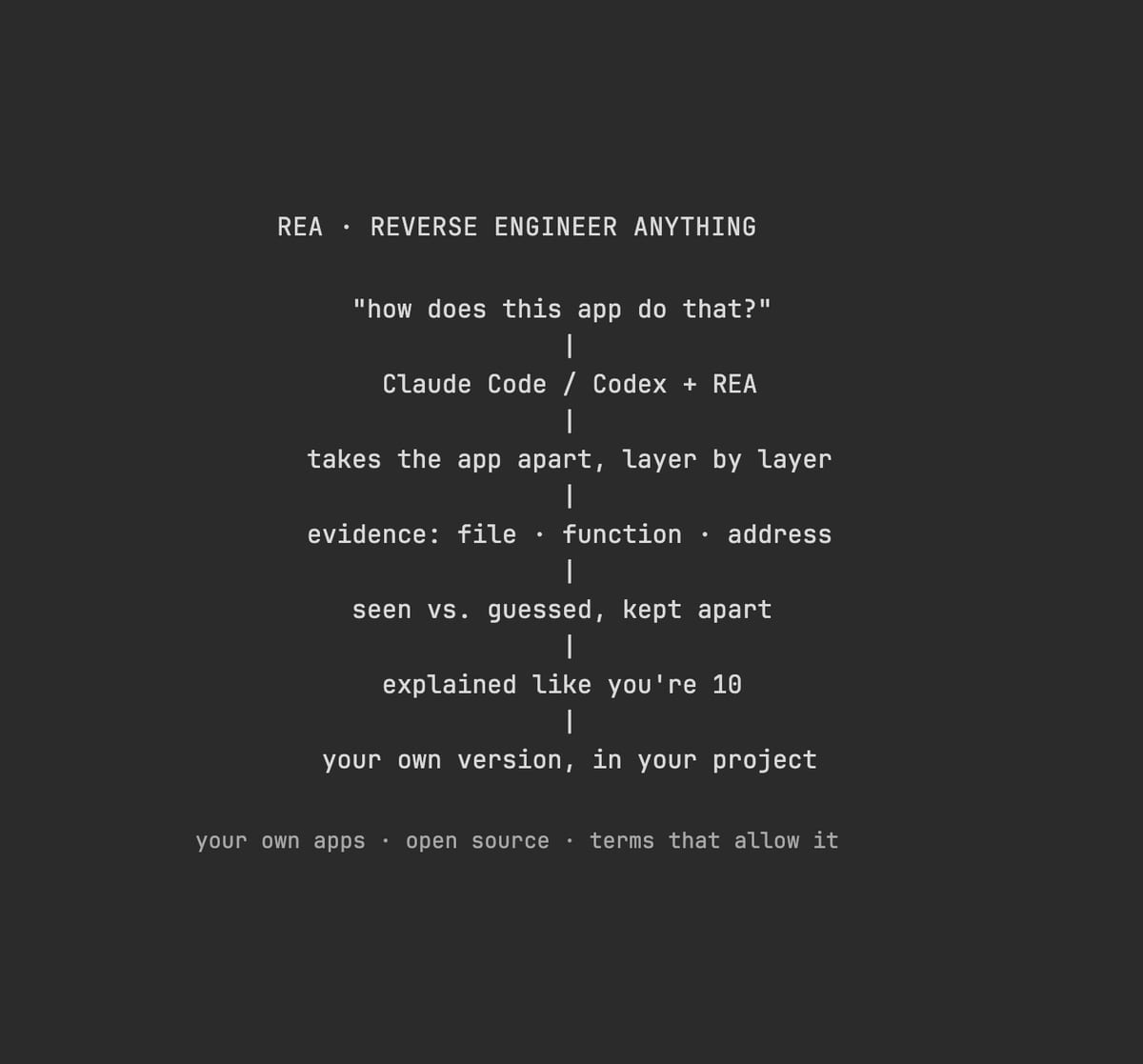
  3. すべての発見を証拠で裏付けてください:どのファイル、どの関数またはアドレス。見たものと推測を分けてください。最後に、10 歳の子供でも理解できる言葉で説明してください。
  4. 明確になったら、自分のプロジェクトで同様のものを構築するために書く必要がある最小限の部分を教えてください。そのコードをコピーせずに。まず計画を見せて、私が同意してから書き始めてください。」

https://t.co/K2ZekYitTW

セットアップ

インストール方法は元のソースをご確認ください。

原文 / README

Highly recommend adding REA to Claude Code or Codex. The name stands for 𝗥𝗲𝘃𝗲𝗿𝘀𝗲 𝗘𝗻𝗴𝗶𝗻𝗲𝗲𝗿 𝗔𝗻𝘆𝘁𝗵𝗶𝗻𝗴. See a feature you like in another app? Have your agent take it apart to see how it's built, then 𝗯𝘂𝗶𝗹𝗱 𝘆𝗼𝘂𝗿 𝗼𝘄𝗻 𝘃𝗲𝗿𝘀𝗶𝗼𝗻 in your project. It's been #1 on GitHub's daily trending two days running and is past 60K stars.

The apps on your computer are finished products. Think of a baked cake: you can taste it, but you can't see the recipe. REA hands your agent the tools made for taking software apart. It works down layer by layer, shows you where each finding comes from, and then walks you through the recipe. You can point it at desktop apps, websites and Android apps.

Ask it things like: → "How does this notes app show search results the moment I start typing?" → "Why does text copied from Notion keep its formatting when I paste it somewhere else?" → "How does this old game work out that ring of bullets?" → "Our company's 10-year-old internal tool lost its source code years ago. What is it actually doing?"

Take apart your own software and open-source code as much as you like. For anyone else's, check the terms first, since many forbid reverse engineering. Don't bring it cracking or license-bypass jobs; the model will most likely refuse anyway.

Run npx rea-agents setup in your terminal, pick your agent when it asks, and restart it. Then send this prompt to Opus 5.5 👇

"I want to use REA to figure out how a feature in some software works.

  1. First ask me which app and which feature I want to study, then have me say whether it's my own, open source, or software whose terms allow reverse engineering. If I can't say, don't start.
  2. Work out what kind of program it is first. If you need Hopper, Ghidra or IDA, tell me which one is missing and where to get it. Don't install it yourself.
  3. Back every finding with evidence: which file, which function or address. Keep what you saw separate from what you're guessing. At the end, explain it all in words a 10-year-old could follow.
  4. Once it's clear, tell me the minimum pieces I'd need to write to build something similar in my own project, without copying its code. Show me the plan first, and only start writing after I agree."

https://github.com/morluto/rea

関連作品