REA MCP
☰
JA
● — 人がオンライン ・閲覧 — 回
スポンサー事例を投稿
X の投稿 · 投稿者 Myttle

REA + Claude Code がアプリを通して機能を追跡 REA (Reverse Engineer Anything

REA + Claude Code がアプリを通して機能を追跡 REA (Reverse Engineer Anything

M
Myttle@xmyttle

1/

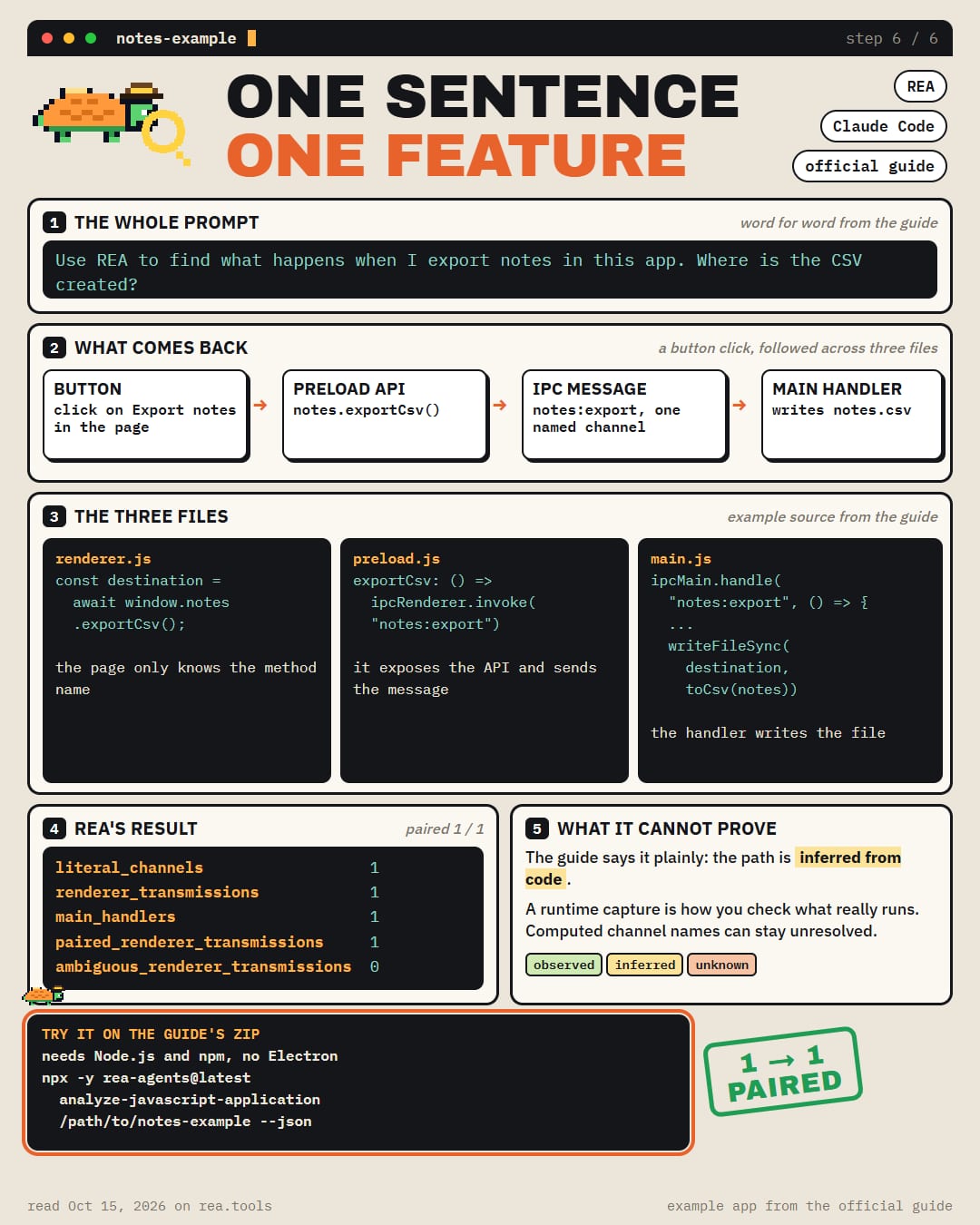
REA + Claude Code traces a feature through an app REA (Reverse Engineer Anything) is the free tool that connects your coding agent to an app's files. Its official guide hands you the prompt Use REA to find what happens when I export notes in this app. Where is the CSV created? What the guide's example app answers → the button calls an API in the page → the API sends a named message (IPC) inward → one handler in the main process catches it → that handler writes notes.csv to Downloads REA matched 1 message to 1 handler, with 0 ambiguous. The guide says plainly that the path is inferred from code, and a runtime capture is how you check what really runs The example is a small zip on http://rea.tools. It needs only Node.js and npm, no Electron install Claude Code is on REA's setup list, next to Codex, Cursor, Gemini CLI and Grok Build

画像1
翻訳済み

この事例について

REA + Claude Code がアプリを通して機能を追跡

REA (Reverse Engineer Anything) は、コーディングエージェントをアプリのファイルに接続する無料ツールです。公式ガイドには次のプロンプトが用意されています

REA を使って、このアプリでノートをエクスポートするときに何が起こるかを見つけてください。CSV はどこで作成されますか?

ガイドのサンプルアプリの答え → ボタンがページ内の API を呼び出す → API が名前付きメッセージ (IPC) を内向きに送信する → メインプロセス内の1つのハンドラーがそれを受け取る → そのハンドラーが notes.csv を Downloads に書き込む

REA は1つのメッセージを1つのハンドラーに一致させ、あいまいなものは0でした。ガイドは、パスはコードから推測されるものであり、実際に何が実行されるかを確認するにはランタイムキャプチャが必要だと明言しています

サンプルは https://t.co/IY2xhc73j1 にある小さな zip です。必要なのは Node.js と npm だけで、Electron のインストールは不要です

Claude Code は REA のセットアップリストにあり、Codex、Cursor、Gemini CLI、Grok Build と並んでいます

セットアップ

インストール方法は元のソースをご確認ください。

原文 / README

REA + Claude Code traces a feature through an app

REA (Reverse Engineer Anything) is the free tool that connects your coding agent to an app's files. Its official guide hands you the prompt

Use REA to find what happens when I export notes in this app. Where is the CSV created?

What the guide's example app answers → the button calls an API in the page → the API sends a named message (IPC) inward → one handler in the main process catches it → that handler writes notes.csv to Downloads

REA matched 1 message to 1 handler, with 0 ambiguous. The guide says plainly that the path is inferred from code, and a runtime capture is how you check what really runs

The example is a small zip on http://rea.tools. It needs only Node.js and npm, no Electron install

Claude Code is on REA's setup list, next to Codex, Cursor, Gemini CLI and Grok Build

関連作品
