REA MCP
☰
JA
● — 人がオンライン ・閲覧 — 回
スポンサー事例を投稿
チュートリアル · 投稿者 Claudia Galeán (💫,💫)

REA: Reverse Engineer Anything(18k スター)それが何をするか 以下のテキストはすべて引用

REA: Reverse Engineer Anything(18k スター)それが何をするか 以下のテキストはすべてプロジェクト README から直接引用したものです。バイナリ、アプリケーション、実行時の動作を横断してリバースエンジニアリングするための 1 つの MCP。

C
Claudia Galeán (💫,💫)@deweytn

1/

REA: Reverse Engineer Anything (18k stars) What it does All text below is quoted directly from the project README. One MCP for reverse engineering across binaries, applications, and runtime behavior. See a feature you like. Understand how it works, down to the binary level. See a feature in an app that you want in your own product? Ask your agent to investigate it with REA. It can inspect the app without its source code, explain how the feature works, show the evidence, and build a version for your project. REA connects your agent to tools for inspecting native binaries, JavaScript and Electron apps, .NET assemblies, and websites. You can also use the same tools from your terminal. Analysis runs locally, and results include the evidence and limitations behind each conclusion. What you can analyze: Native binaries: Pseudocode, assembly, strings, symbols, calls and references Offline ELF layout: Sections, segments, original symbols/relocations and static mitigation candidates JavaScript / Electron: Modules, imports, source maps, routes, IPC and native add-on relationships Websites: Page structure, scripts, network observations and requested screenshots Saved network captures: Requests, responses, exposed payloads and source locations .NET assemblies: Metadata, CIL instructions, declared native dependencies and build comparisons Android APKs: Manifest declarations, classes, decompiled methods and references Firmware: Regions, extraction results and native-analysis handoffs Packages and resources: File inventories, digests, plists, Apple bundle anatomy and extracted resources Process behavior: Terminal output, interactions, exit and filesystem observations, and run comparisons With Node.js and npm installed, run: npx rea-agents setup Repository https://github.com/morluto/rea Main contributor @morluto https://x.com/morluto
画像1
翻訳済み

この事例について

REA: Reverse Engineer Anything(18k スター)

それが何をするか

以下のテキストはすべてプロジェクト README から直接引用したものです。

バイナリ、アプリケーション、実行時の動作を横断してリバースエンジニアリングするための 1 つの MCP。

気に入った機能を見つけましょう。それがどのように動作するかをバイナリレベルまで理解できます。

アプリ内で見つけた機能を自分の製品にも取り入れたいですか?エージェントに REA で調査させましょう。ソースコードなしでアプリを検査し、その機能がどのように動作するかを説明し、証拠を示し、あなたのプロジェクト用のバージョンを構築できます。

REA は、ネイティブバイナリ、JavaScript および Electron アプリ、.NET アセンブリ、ウェブサイトを検査するためのツールにエージェントを接続します。同じツールをターミナルからも使用できます。分析はローカルで実行され、結果には各結論の背後にある証拠と制限が含まれます。

分析できるもの:

ネイティブバイナリ:擬似コード、アセンブリ、文字列、シンボル、呼び出しと参照

オフライン ELF レイアウト:セクション、セグメント、元のシンボル/再配置、静的緩和候補

JavaScript / Electron:モジュール、インポート、ソースマップ、ルート、IPC、ネイティブアドオン関係

ウェブサイト:ページ構造、スクリプト、ネットワーク観察、要求されたスクリーンショット

保存されたネットワークキャプチャ:リクエスト、レスポンス、露出したペイロード、ソース位置

.NET アセンブリ:メタデータ、CIL 命令、宣言されたネイティブ依存関係、ビルド比較

Android APK:マニフェスト宣言、クラス、逆コンパイルされたメソッドと参照

ファームウェア:領域、抽出結果、ネイティブ分析への引き継ぎ

パッケージとリソース:ファイルインベントリ、ダイジェスト、plist、Apple バンドルの構造、抽出されたリソース

プロセス動作:ターミナル出力、インタラクション、終了とファイルシステムの観察、実行比較

Node.js と npm がインストールされている状態で、次を実行します:npx rea-agents setup

リポジトリ https://t.co/mx3o8zVC6b

主な貢献者 @morluto https://t.co/00jjwszDHQ

セットアップ

インストール方法は元のソースをご確認ください。

原文 / README

REA: Reverse Engineer Anything (18k stars)

What it does

All text below is quoted directly from the project README.

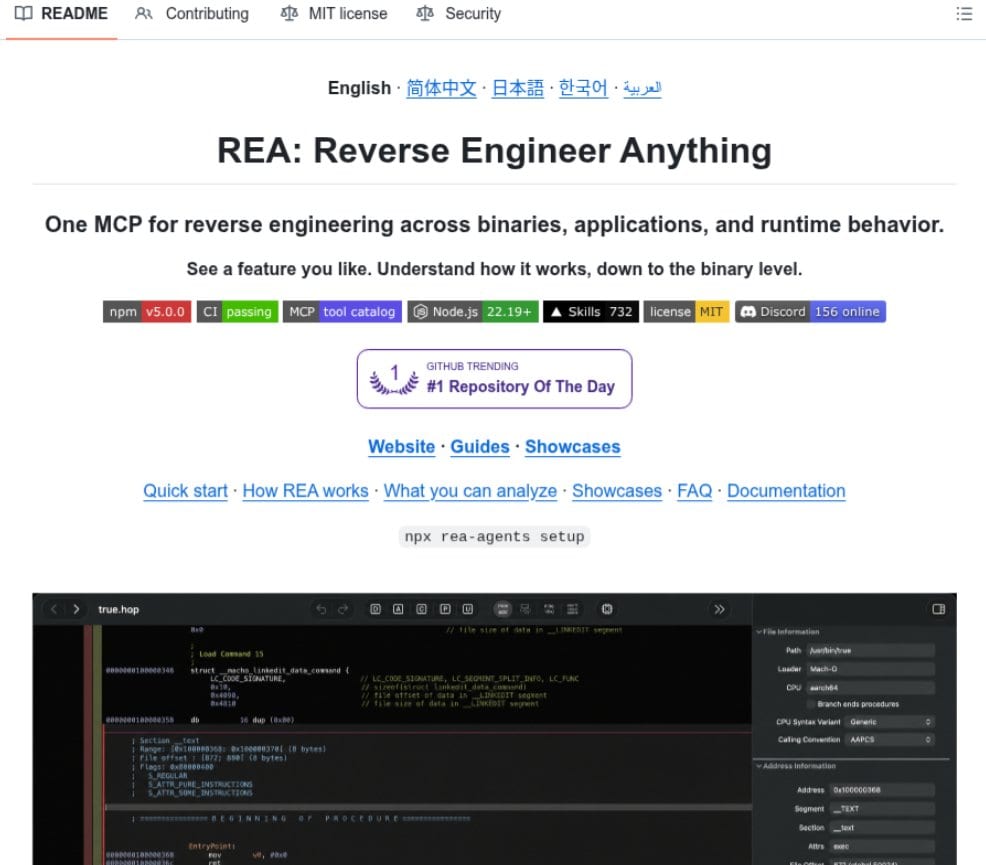
One MCP for reverse engineering across binaries, applications, and runtime behavior.

See a feature you like. Understand how it works, down to the binary level.

See a feature in an app that you want in your own product? Ask your agent to investigate it with REA. It can inspect the app without its source code, explain how the feature works, show the evidence, and build a version for your project.

REA connects your agent to tools for inspecting native binaries, JavaScript and Electron apps, .NET assemblies, and websites. You can also use the same tools from your terminal. Analysis runs locally, and results include the evidence and limitations behind each conclusion.

What you can analyze:

Native binaries: Pseudocode, assembly, strings, symbols, calls and references

Offline ELF layout: Sections, segments, original symbols/relocations and static mitigation candidates

JavaScript / Electron: Modules, imports, source maps, routes, IPC and native add-on relationships

Websites: Page structure, scripts, network observations and requested screenshots

Saved network captures: Requests, responses, exposed payloads and source locations

.NET assemblies: Metadata, CIL instructions, declared native dependencies and build comparisons

Android APKs: Manifest declarations, classes, decompiled methods and references

Firmware: Regions, extraction results and native-analysis handoffs

Packages and resources: File inventories, digests, plists, Apple bundle anatomy and extracted resources

Process behavior: Terminal output, interactions, exit and filesystem observations, and run comparisons

With Node.js and npm installed, run: npx rea-agents setup

Repository https://github.com/morluto/rea

Main contributor @morluto https://x.com/morluto

関連作品