REA MCP
☰
ZH-TW
● — 人在線上 · 瀏覽 — 次
贊助提交案例
X 貼文 · 發布者 Myttle

REA + Claude Code 透過一個應用程式追蹤一項功能 REA (Reverse Engineer Anything

REA + Claude Code 透過一個應用程式追蹤一項功能 REA (Reverse Engineer Anything

M
Myttle@xmyttle

1/

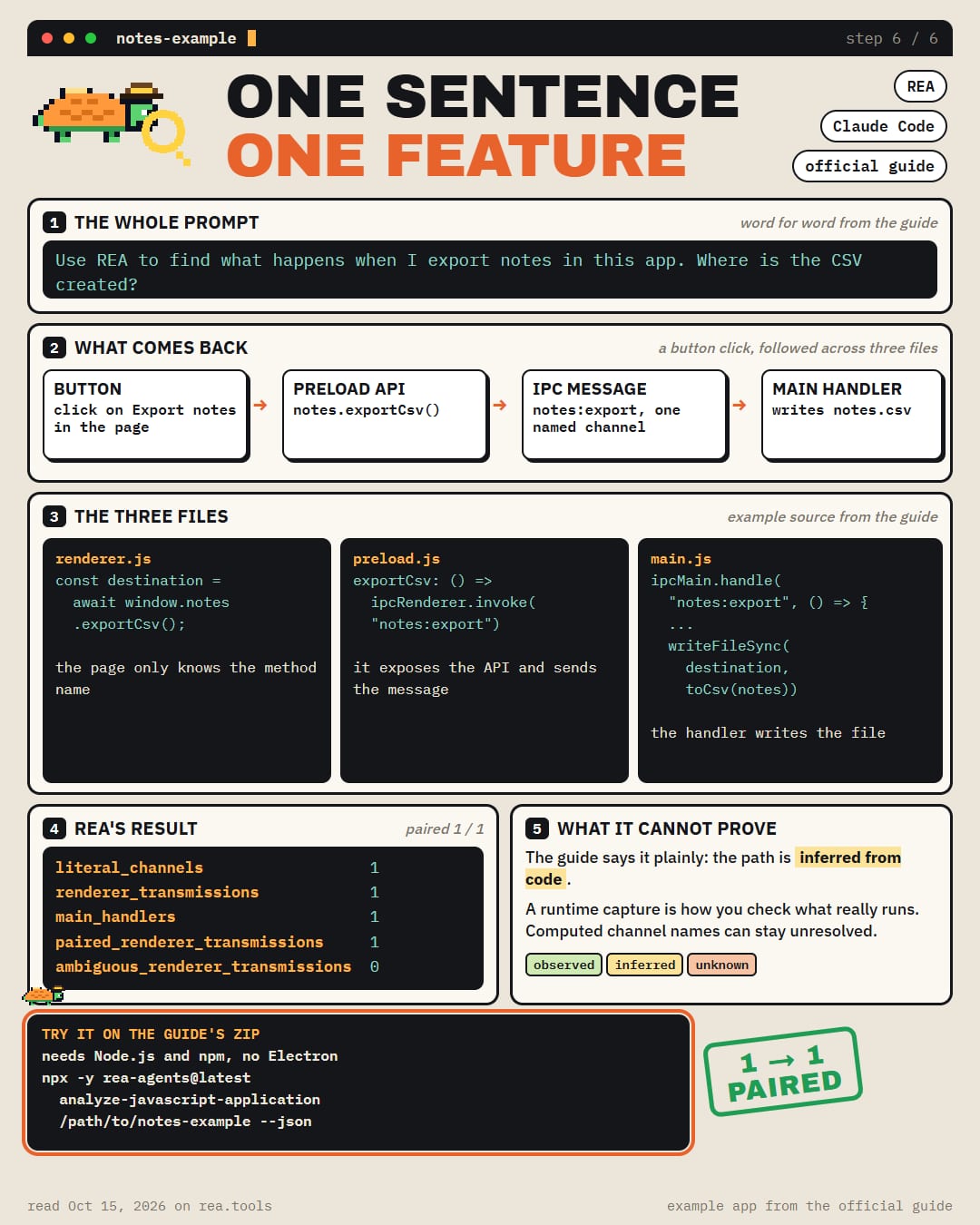
REA + Claude Code traces a feature through an app REA (Reverse Engineer Anything) is the free tool that connects your coding agent to an app's files. Its official guide hands you the prompt Use REA to find what happens when I export notes in this app. Where is the CSV created? What the guide's example app answers → the button calls an API in the page → the API sends a named message (IPC) inward → one handler in the main process catches it → that handler writes notes.csv to Downloads REA matched 1 message to 1 handler, with 0 ambiguous. The guide says plainly that the path is inferred from code, and a runtime capture is how you check what really runs The example is a small zip on http://rea.tools. It needs only Node.js and npm, no Electron install Claude Code is on REA's setup list, next to Codex, Cursor, Gemini CLI and Grok Build

圖片1
已翻譯

關於這個案例

REA + Claude Code 透過一個應用程式追蹤一項功能

REA (Reverse Engineer Anything) 是一個免費工具,可以將你的程式碼代理連接到應用程式的檔案。其官方指南提供了以下提示

使用 REA 找出我在這個應用程式中匯出筆記時會發生什麼。CSV 是在哪裡建立的?

指南的範例應用程式給出的答案 → 按鈕呼叫頁面中的 API → API 向內傳送一條命名訊息 (IPC) → 主程序中的一個處理器捕獲它 → 該處理器將 notes.csv 寫入 Downloads

REA 將 1 條訊息匹配到 1 個處理器,0 個模糊。指南明確表示,路徑是從程式碼推斷出來的,而執行階段捕獲是檢查實際執行內容的方式

範例是 https://t.co/IY2xhc73j1 上的一個小型 zip 檔案。它只需要 Node.js 和 npm,無需安裝 Electron

Claude Code 在 REA 的設定清單中,與 Codex、Cursor、Gemini CLI 和 Grok Build 並列

安裝設定

安裝方式請查看原始來源。

原文 / README

REA + Claude Code traces a feature through an app

REA (Reverse Engineer Anything) is the free tool that connects your coding agent to an app's files. Its official guide hands you the prompt

Use REA to find what happens when I export notes in this app. Where is the CSV created?

What the guide's example app answers → the button calls an API in the page → the API sends a named message (IPC) inward → one handler in the main process catches it → that handler writes notes.csv to Downloads

REA matched 1 message to 1 handler, with 0 ambiguous. The guide says plainly that the path is inferred from code, and a runtime capture is how you check what really runs

The example is a small zip on http://rea.tools. It needs only Node.js and npm, no Electron install

Claude Code is on REA's setup list, next to Codex, Cursor, Gemini CLI and Grok Build

更多類似作品
